Main
Are you frustrated with iMovie? The iMovie 3 fixes and issues page is back up and the iMovie 4 still exists, the iMovie 5 HD page has been updated as well as the new iMovie 6 HD Fixes page. I suggest you read this page first before doing anything too drastic (such as reload). That is not to say that backing up your home directories and reloading the operating system is a bad idea. This is true especially if you have upgraded your system a few times (for instance you ran 10.x, 10.1.x, 10.2.x, ) and/or if you have ran "haxies" in the past.

Audio
- Cannot hear one or all sound tracks
- Cannot hear audio on imported MPEG (.MPG) movie
- Cannot use iTunes song I purchased in my movie
- My audio is out of sync with my video
- MP3 or sound is grayed out and will not import
- Sound is coming out of only one speaker - Converting Mono to Stereo
- Where can I get more sound files?
- Low volume on sound import - off deck
- Exporting audio for use in other programs like Garageband or iTunes
Video
- Text and titles are blurry or hard to read
- Video is too dark when exporting
- Part of my video is clipped off or my titles are chopped of when I view my video on a television
- Working with Ken Burns and stills
- How should I scan my images? What DPI setting should I use?
- Cannot import picture or image
- Automatic scene detection not working
Usage
- Project will not save and or have constant import/export problems
- Cannot open the project as another user
- Minimizing iMovie
- Adding a title
- iMovie 4 Title usage
- Is my camera compatible?
- How do I split a project in two?
- How do I merge two projects?
- How can I cut and paste from multiple projects?
- Why do I get "Language Resource File not found, reinstall application." when I launch a project?
- How do I start a project on another disk?
- Cropping the iMovie image (making the video fill the screen)
- How come my movies import as one long clip? (No scene breaks)
- How can I archive or save my movies for a long time, to edit them later?
- I have a corrupted project file
- Movie is longer than clips or long black footage at end of movie
- Disk responding slowly message when doing voice-over's
- Camcorder will not connect to iMovie - No camera attached
- Scrolling block corrupts project
Quicktime & Third-Party Plugins
Importing
Exporting
- Getting your videos ready for the web or exporting for the web
- Comparing different export formats (DivX, Real, MPEG-1, MPEG-4, 3ivX, Sorenson Pro, Windows Media, etc.)
- Exporting DivX (AVI)
- Exporting MPEG-1
- Exporting to Real Media
- Exporting to Windows Media to Windows Media HD
- Exporting H.264 (a.k.a. MPEG-4 Part 10, DVD-HD, or AVC)
- Exporting a "self contained full quality" DV file
Tips & Tricks
- Keyboard Shortcuts
- The iMovie Trashcan
- Switching to PAL or NTSC
- Making VCD's with Toast 5
- Making SVCD's with Toast 6
- Making a CD-ROM that will play on a windows machine
- Cannot import large DV file and or QuickTime error -40
- Adding sounds to the iMovie Library the iMovie 3 way
- Calibrating your monitor
- Putting iTunes visuals in your Movies
- Ripping DVD's and using MPEG files
- Getting an older version of iMovie back
- Shooting 16:9 widescreen
- Sync audio and video on two cameras
- Fading music for voice-over's without muting it
- Blackout, mask, or superimpose part of movie
- NTSC move to PAL DVD or vice versa
- Smooth Slow Motion
- Using Sony camcorders IP series (DCR-IP220, DCR-IP55, DCR-IP1)
- Using a Powerpoint presentation in iMovie
- Overlaying a still image on a video
- Rotating a clip
iMovie 5 / iMovie HD specific
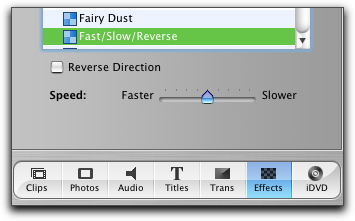
- Where is the change speed (fast/slow) and reverse in iMovie 5?
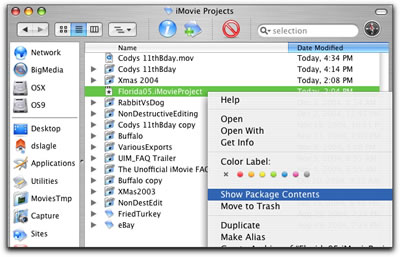
- How do I look inside the iMovie project file/folder now?
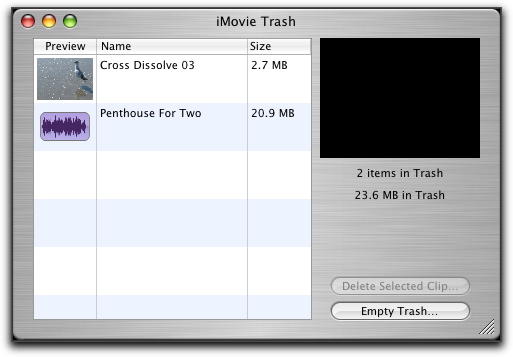
- What does the iMovie Trash look like now?
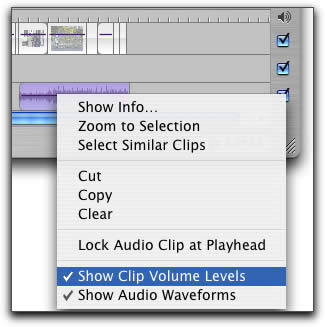
- Where did the clips audio waveforms and volume control go?
Tutorials
These are various iMovie video tutorials I have found on the web and I will be add quite a few more in the coming months
- The basics right from Apple. If you have not watched these, you need to.
- Edit clips and pics using timeline snapping
- DVD to SVCD, DVD to DVD-R, DVD to DivX, DivX to DVD, SVCD to DVD